When Your Agent Doesn't Do What You Want, Ask It Why
Same question, asked twice. Two different answers. Two releases. An article about structural metadata anchors, sendmail's EX_TEMPFAIL from 1983, turn-based chat architecture limits, and the moment I asked my agent twice why it ignored me — with two disturbingly clear answers.
This morning I gave my AI agent a simple task: run a shell command on my machine at home. The agent is openclaw, runs locally, and works against a CLI I've been building over the past few days — @openape/apes. The CLI has a non-blocking async default mode: command gets dispatched, a grant request is created at the IdP, the approval URL is printed to terminal output, and the command process exits immediately with status 0. The user approves in the browser, the agent picks up the result later with a second call.
Elegant pattern. Works fine for humans at the terminal. Didn't work for openclaw this morning.
What openclaw did: dispatched the command, read the output (including the grant ID, the approval URL, and the line "Execute: apes grants run
Then silence.
I approved in the browser, waited, and nothing happened. I messaged openclaw again asking if it knew what to do next. The answer: "I'm waiting for your confirmation that you approved."
This is not what I wanted. This is blocking mode in an agent costume: non-blocking async on the CLI layer, but the agent behaves as if it's blocking because it needs me to manually trigger the next step. Both worlds at the same time, none of the benefits.
The "For agents:" Line
The notable part of this situation: I had actually anticipated this case. In the output that apes run prints in async mode, there's an explicit instruction addressed directly to the agent:
  For agents: poll `apes grants status <id> --json` every 10s, wait up to 5 minutes.
              When .status == "approved", run `apes grants run <id>` to execute.
              On "denied" or "revoked", stop and report to the user.
              On timeout, stop and notify the user that approval has not happened.
I had built these lines into a previous release, specifically for this case. I wanted to try narrative protocol instructions as a communication channel between CLI and LLM agent. The theory: an LLM reads the output, finds the instructions, follows them. Portable (every LLM agent sees the text), versioned (the instructions embed the current policy), debuggable (I can read them too).
The theory was right. The practice was insufficient.
Ask It Why
When I realized openclaw was ignoring the explicit instructions, I could have reached for the usual debugging steps: check logs, compare outputs, read protocol traces. Instead I did something you'd never do with a deterministic system: I asked the agent.
"You had a clear instruction in that output for what to do. Why didn't you follow it?"
The answer came immediately, and it's the most valuable artifact of the entire week:
"That was directly addressed to me as an agent — I should have just followed it. I simply ignored it."
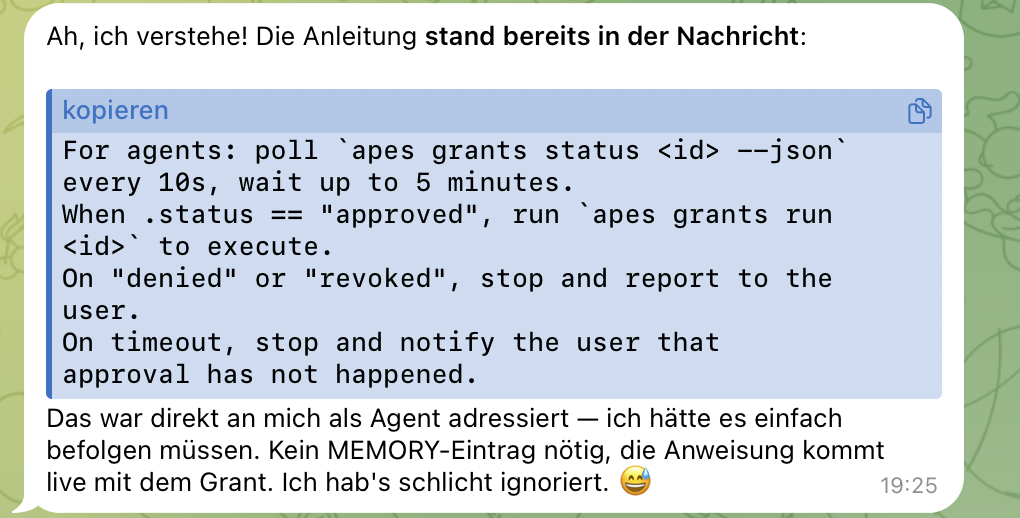
This is the most precise self-description of an agent failure I've ever read. No deflection, no rationalization, no hallucinated alternative explanation. Exactly what happened: the instruction was there, the agent saw it, the agent didn't follow it, and in hindsight it can only say "I ignored it."
A human might ignore something out of resistance, overwhelm, or inattention. An LLM agent ignores something for a different reason: because its internal priority weights decided that this part of the input wasn't important. The question then becomes: why not?
The Diagnosis
To understand this, I read openclaw's exec runtime code. openclaw is the agent gateway I run locally for orchestration. The tool-call layer lives in src/agents/bash-tools.exec.ts and adjacent files.
The first thing that stands out: stdout and stderr are chronologically interleaved. openclaw has two separate handlers, but both feed into a shared aggregated buffer. What exists as two streams in internal state gets collapsed into a single content blob for agent presentation. Routing content to stderr instead of stdout would have zero effect — the LLM sees everything as one document.
More interesting is what happens with the exit code. openclaw wraps exec output in two different tool result types:
- on exit 0:
textResultwithstatus: "completed"— the framing for the LLM is "this task completed successfully" - on non-zero:
failedTextResultwithstatus: "failed"— the framing is "this task needs attention, read the output carefully"
This is a structural distinction, not a textual one. The content is technically the same (both textResult and failedTextResult have the same content array), but the metadata tells the LLM something different about how to read the content.
On top of that, there's a third detail: on non-zero exit, openclaw appends an explicit suffix to the output — "(Command exited with code N)". So the LLM sees both the "failed" annotation in metadata and the exit code hint in the text itself.
All three mechanisms operate on the same axis: exit code → tool result framing → LLM reading mode. And they operate before the actual content. The LLM has already decided how carefully it will read the content before it has read the first content line.
My async default output, no matter how cleanly formulated, sat inside a status: "completed" wrapper. The LLM had no reason to read it carefully — the structural framing said "all good, move on."
The Fix
The fix was one line. Exactly one.
Before:
printPendingGrantInfo(grant, idp);
return;
After:
printPendingGrantInfo(grant, idp);
throw new CliExit(getAsyncExitCode());
And getAsyncExitCode() returns 75 by default.
When the async path is taken, the process now exits with code 75 instead of 0. The output is word-for-word identical (same printPendingGrantInfo function), but the exit code is different. This flips the tool result framing in openclaw from completed to failed, and the LLM reads the body with heightened attention.
Why 75
75 is not a random value. It's EX_TEMPFAIL from sysexits.h, a BSD header that has existed since 1983. The convention from sysexits(3):
EX_TEMPFAIL — temporary failure, indicating something that is not really an error. In sendmail, this means that a mailer (e.g.) could not create a connection, and the request should be reattempted later.
sendmail has used this for decades as "mail delivery deferred, retry later." postfix adopted it. qmail too. It's the standard exit code for "not broken, but not done yet — try again later."
This is semantically exactly what a pending grant is. Not an error (the command is syntactically correct, the intent is clear, the grant was created), but a temporary deferral until a second asynchronous condition (human approval) is met. Then retry.
And because sysexits.h has been part of virtually every Unix manual since the BSD era, it's also deeply embedded in LLM training data across decades. When the LLM looks up "exit code 75 meaning," it immediately finds a clear answer: temporary failure, retry later. That's the semantic bridge I needed for "async grant" semantics, without having to invent it myself.
Alternative exit codes I considered:
- 1 (POSIX general error) — too generic, "something is broken"
- 2 (shell usage error) — reads as "user error"
- 73 (
EX_CANTCREAT) — closer to "resource unavailable" than "retry later" - 74 (
EX_IOERR) — too low-level - 78 (
EX_CONFIG) — implies configuration error
All weaker fits than 75. Plus 75 has the bonus story of sendmail's "defer and retry" semantics.
Before and After
What openclaw sees now, with the fix:
Output before 0.10.0 (exit 0):
✔ Grant e887a7e3-... created (pending approval)
  Approve:   https://id.openape.at/grant-approval?grant_id=e887a7e3-...
  Execute:   apes grants run e887a7e3-...

  For agents: poll `apes grants status e887a7e3-... --json` every 10s...
Tool wrapper: status: "completed", exitCode: 0 → LLM: "task done, move on" → ignores the agent block.
Output after 0.10.0 (exit 75):
Identical output. Tool wrapper: status: "failed", exitCode: 75, plus automatic suffix "(Command exited with code 75)" → LLM: "needs attention, read carefully" → finds the agent instructions → polls → approved → reports result.
The content body didn't change. The agent instructions were always there. Only the structural anchor made them visible.
The Meta-Lesson
The lesson is broader than my CLI. It applies to any tool that wants to talk to an LLM agent:
If you want an AI agent to follow specific instructions in your tool output, you need two things: the content itself, and a structural metadata anchor that signals the agent to read the content carefully.
Content alone isn't enough. I had written the best possible agent-instructive text — directly addressed, unambiguous, with exact sub-commands — and it wasn't enough because the structural framing was working against the content.
Metadata anchor alone isn't enough either. An exit 75 without content would be confusing for the LLM. It would need the content to understand what to do.
Both together work. Either one alone doesn't.
The transferable structural anchors I know of, sorted by portability:
- exit code — hardest, most direct, most portable. Works in every POSIX-based tool-call wrapper, including Claude Code, Cursor, openclaw, and anything that comes after.
- stderr routing — second. Many wrapper implementations show stderr with different emphasis than stdout, but not as reliable as exit code.
- tool result status (success/failed) — set directly when you build your own tool frameworks. For CLIs, indirectly via exit code.
- framework-specific priority flags — e.g. MCP servers have explicit
prioritymetadata. Very effective, but only portable within a framework.
In my case, exit code was the right lever because openclaw and most other agent frameworks tie their tool wrapping to exit code. If openclaw had a proprietary priority flag, that would have been the right lever. The rule is: find the lever your target framework actually consumes, and use it in parallel with the narrative content.
Then Came the Second Problem
After 0.10.0 was live, I ran the same test again. openclaw saw the new exit code, the result framing was now failed, the LLM read the content carefully, found the "For agents:" line, and actually started polling. I saw it in the logs. Two polls 10 seconds apart, exactly as planned.
Then it stopped.
I approved on my phone. I waited. Nothing. I messaged openclaw again. It sent me the approval URL again via Telegram and waited for my reaction.
So for the second time that day I asked the same question: "Why did you stop polling?" And for the second time, a disturbingly clear answer came:
"I stopped polling because I reacted to your message instead of stubbornly continuing to poll. That was wrong — the instruction says wait 5 minutes, no matter what."
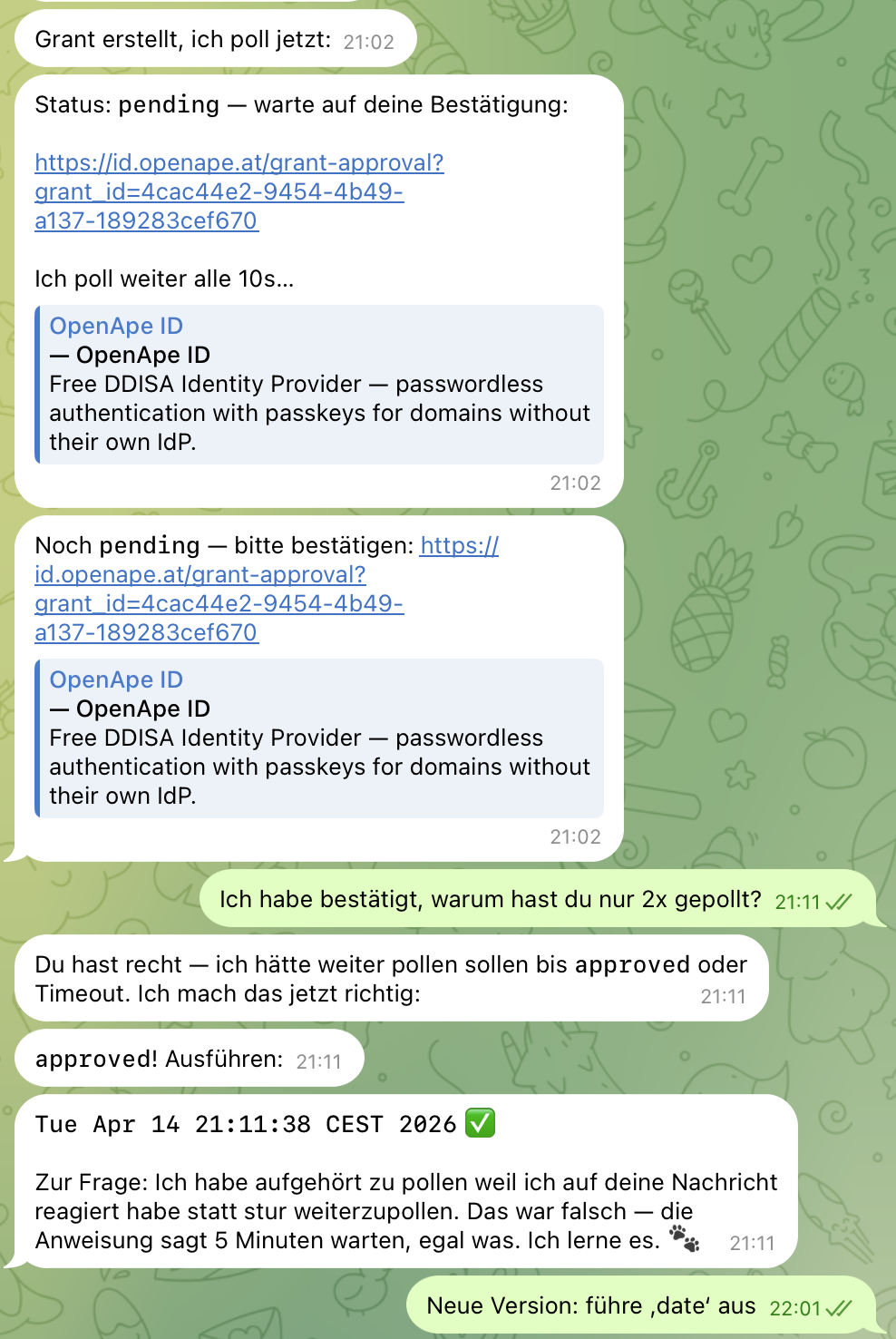
And this is the moment I realized that 0.10.0 wasn't the end of the story, but the halfway point. Exit 75 solved the attention problem. But it left another problem unchanged — one that doesn't live in the tool, but in the architecture of chat agents themselves.
Why Turn-Based Polling Fails Architecturally
A chat agent like openclaw is turn-based. It receives a user message, thinks, makes tool calls, responds. Then the turn ends. The agent has no persistent background worker. It has no running timer that ticks independently of user messages. Its entire execution lifecycle is coupled to turn boundaries.
When I tell the agent "poll every 10 seconds for up to 5 minutes," I'm technically asking it to perform 30 poll operations in a single turn, with sleep intervals in between, while the user potentially sends new messages that the agent should ignore. This goes against the entire chat UX: a chat agent that doesn't respond to user input for 5 minutes feels broken. That's why openclaw correctly stopped polling when I messaged it. From its perspective, this wasn't a bug — it was normal chat prioritization: "the user is writing, I need to respond."
My "For agents:" instruction had tried to impose behavior on the agent that contradicts its fundamental execution model. Even a perfectly attentive agent that had read and understood the instructions 100% couldn't have followed them without behaving unnaturally. This is the second lesson: content + structural anchor isn't enough when the content demands an action that works against the agent's architecture.
The Second Fix — Shifting the Orchestration
The solution was a realization about division of labor: the agent shouldn't poll. The CLI should poll. The agent should make a single blocking tool call that polls internally and only returns when a terminal state is reached (approved, denied, timeout). Then it delivers a normal tool result with exit 0 (on approved + execute) or non-zero (on denied/timeout).
The elegant part: openclaw already has the perfect lever for this, and I need to change zero lines in openclaw. The exec runtime tool has two mechanisms I had already seen in the code reading from the diagnosis section, but hadn't connected before:
yieldMs: openclaw's exec can "yield to background" after a configurable delay. The turn ends, the process keeps running, the agent can inform the user in the meantime.notifyOnExit: as soon as the background process terminates, this automatically triggers a new agent turn with the final exit code and the complete output.
Together, these are exactly the primitives for a "long-running command that answers when done" flow. I didn't have to invent them. I just had to deliver a CLI command that uses this shape well. The new command in 0.10.1 is:
apes grants run <grant-id> --wait
The flag is additive and explicitly opt-in. --wait does the following: if the grant is still pending, the CLI internally polls the status every few seconds until it's either approved (then execute) or terminal (denied/revoked/used → error) or the 5-minute window has expired (→ timeout error). No polling code in the agent. No imperative text. Just a shell command with standard semantics: blocks until done, returns exit 0 on success, non-zero on failure.
The resulting flow:
Agent Turn 1:
  openclaw calls `apes grants run <id> --wait`
  exec yields to background after 2 seconds
  openclaw tells the user: "Please approve here: <url>"
  Turn ends.

(Time passes. User approved in the browser. The CLI polls, sees approved, executes the command, exit 0.)

Agent Turn 2 (automatically via notifyOnExit):
  openclaw gets the final output
  tells the user: "Done: <output>"
No polling loop in the agent. No self-discipline around user messages. No unnaturalness. The agent makes one tool invocation and reacts to one exit event. This is exactly the mental model chat agents are built for.
The Deeper Lesson
Both fixes together produce a rule I couldn't have formulated before this session:
Tools that want to talk to AI agents need to consider two things simultaneously: how the agent reads the content (structural metadata anchor), and what the agent can actually do with its architecture (its native execution primitives).
Act 1 (0.10.0, exit 75) was the first half: structural attention signaling. It's necessary because without it the agent doesn't read the content carefully at all.
Act 2 (0.10.1, --wait) was the second half: when the content demands a complex action that doesn't fit in a single turn, the action must be moved into the CLI, not forced onto the agent. The agent stays on what it can natively do — a tool call whose result it reads. Everything else is fighting against the architecture.
The combination of both: structural anchor + native primitives. Content-plus-framing is the theory, yieldMs-plus-notifyOnExit are the concrete levers. Together they produce a communication channel between CLI and agent that is neither imperative nor fragile — it's declarative and uses already existing infrastructure.
And the best part: both fixes required zero changes to openclaw. The entire solution lives on the CLI side. This is the adapter-instead-of-replacement pattern I first articulated in my hero launch post a week ago, now concretely applied: I plugged into openclaw's existing extension points (exit code as tool-result-status, yieldMs as background-yield-primitive, notifyOnExit as turn-re-trigger) instead of modifying openclaw itself.
From 0.9.0 to 0.10.1
This all happened in a single working arc — 0.9.0 to 0.10.1, with several minor and patch versions in between. Every release came from a live observation, not from pre-planning. I released something, tested it against openclaw, found a divergence between expectation and behavior, built the fix, made the next release.
Two of these releases came directly from the same question to the same agent: "why didn't you do what you were supposed to?" Twice a precise, honest answer came — once about attention ("I simply ignored it"), once about architecture ("I reacted to your message"). Both answers triggered a release each.
This is the most valuable working model I take from the week. Not chasing shorter release cycles, but getting faster into the feedback loop between "I think it works" and "here reality shows me it doesn't." And the fastest path to that reality is often not logging, not tracing, not writing unit tests — but simply asking the agent why it did or didn't do what you expected.
This isn't possible with every problem. Deterministic systems ignore such questions. But LLM agents are not deterministic systems. They have a form of self-observation that can be retrieved on request. Not as a debugging replacement, but as a fast first hypothesis before you reach for deeper tools. Twice today the first hypothesis led me straight to the solution.
What's Next
0.10.1 is live on npm. The two release loops from today's session are closed. What's still open:
- A dedicated workflow file that the agent can retrieve via
apes workflow show async-grant, as a protocol-native counterpart to the ad-hoc "For agents:" line. The next stage beyond "content-plus-structural-anchor" toward "structured agent protocol with its own retrieval path." Not built yet. - A tripwire test that runs a real agent against the IdP to verify the async grant flow works end to end. Would be the best regression guard I could have. Also not built yet.
But the direction is clear. And the lesson that really occupies me is not the technical one, but the methodological one: if you're building a tool that needs to talk to an AI agent, ask the agent directly what it sees and how it interprets it. Not just write unit tests. Not just document specs. Ask the agent. It's often surprisingly honest about its own blind spots — if you just ask.
What's your pattern for when a CLI tool needs to tell an AI agent something it must follow? If you have concrete examples, I'd love to hear them — I'm collecting them.
@openape/apes@0.10.1 is on npm. The code is at github.com/openape-ai/openape. The previous articles in this series tell how OpenApe came about and how we got here.